Digital Twin Integration for Festo PLC Factory Line
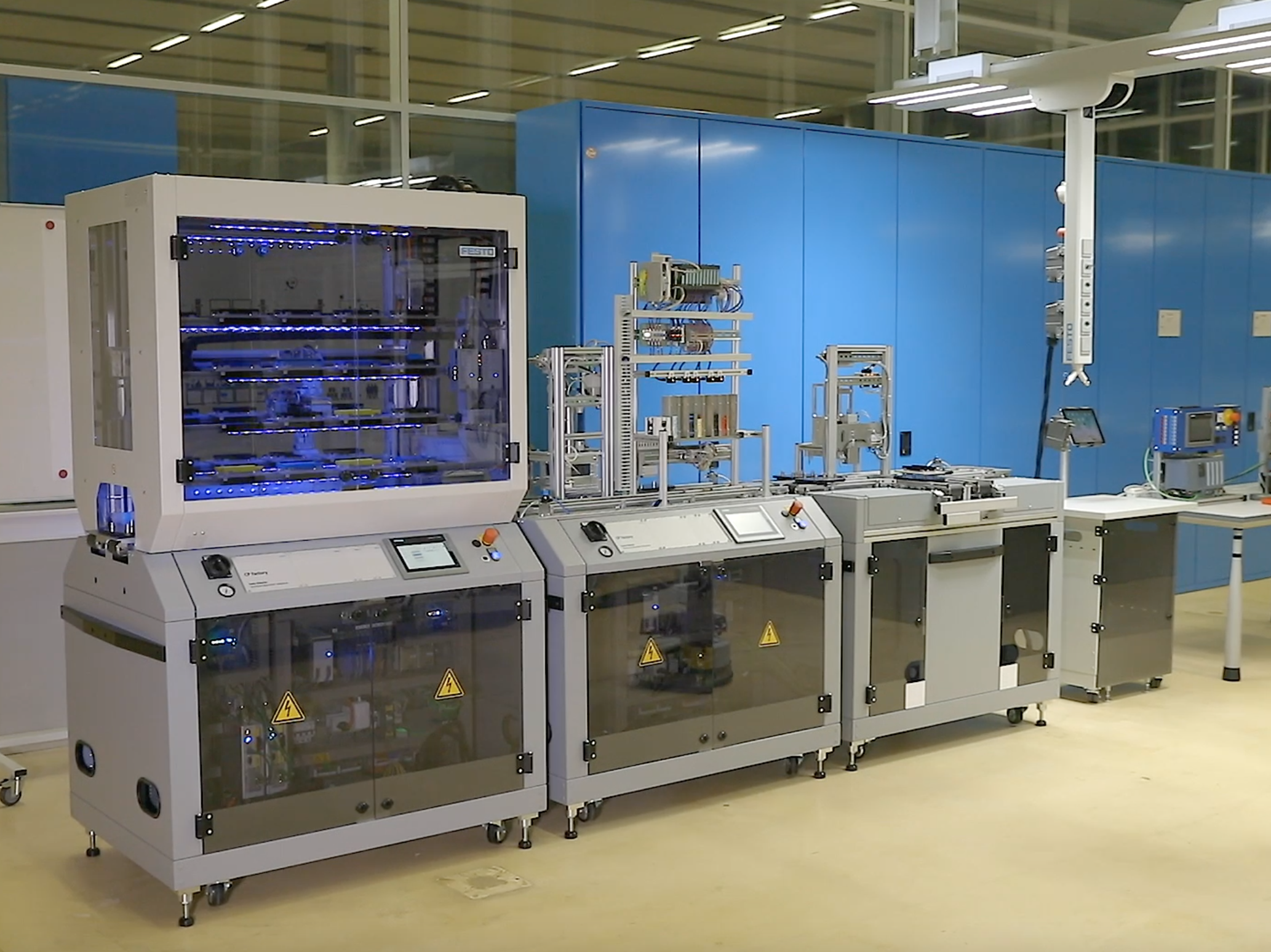
A Digital Twin for a Festo manufacturing factory setup used by Coordis
This project was executed in collaboration with the Digital Twin Lab (DT Lab) at Eindhoven University of Technology (TU/e) and the High-Tech Software Cluster (HTSC) at the Brainport Industries Campus (BIC). The primary objective was to design and implement a full Digital Twin (DT) for a Festo manufacturing factory setup used by Cordis, a model-based software generation company.
Problem & Challenges
In high-tech manufacturing, validating control software on physical machinery is costly, risky, and time-consuming. Errors can lead to hardware damage or business operation downtime. Cordis needed a virtual environment (DT) to safely test their PLC (Programmable Logic Controller) control software before deployment.
Key challenges in this project were, strict adherence to real-time latency constraints (under 300ms), designing a modular and scalable architecture to accommodate future extensions, a seamless integration and data integrity across heterogeneous systems such as PLCs, Unity, and external services.
Solution
To address these challenges, we designed and implemented a modular, event-driven Digital Twin solution using the DT Lab’s architecture as a reference. The system is built to operate in a closed loop, capable of switching seamlessly between controlling the real factory and a virtual simulation.
Architecture
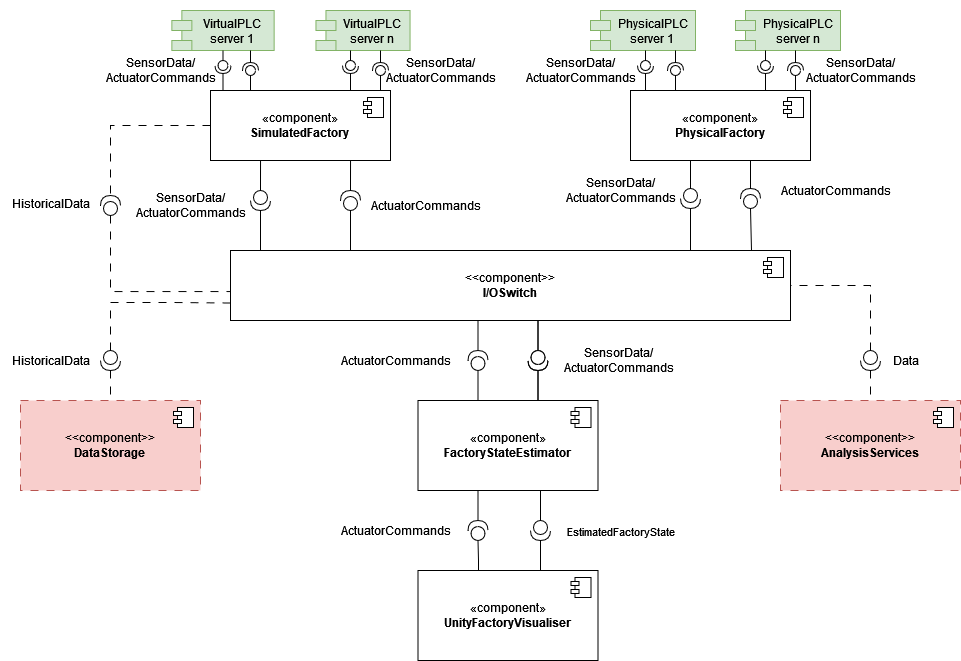
The Digital Twin system follows a layered, component-based architecture where each component has a single responsibility and communicates through well-defined interfaces. The architecture allows for flexible mode switching between physical and simulated factory operations.
1. PhysicalFactory - Real Hardware Interface
The Physical Factory contains two elements. The OPC client that connects to the physical PLC servers and reads from and writes to them. The other element is the IoAddressMaps that map the endpoint names in the PLC’s to the names used internally in the system. When values in the server don’t update towards the rest of the application, this is where you should check.
2. IOSwitch - Central Routing Hub
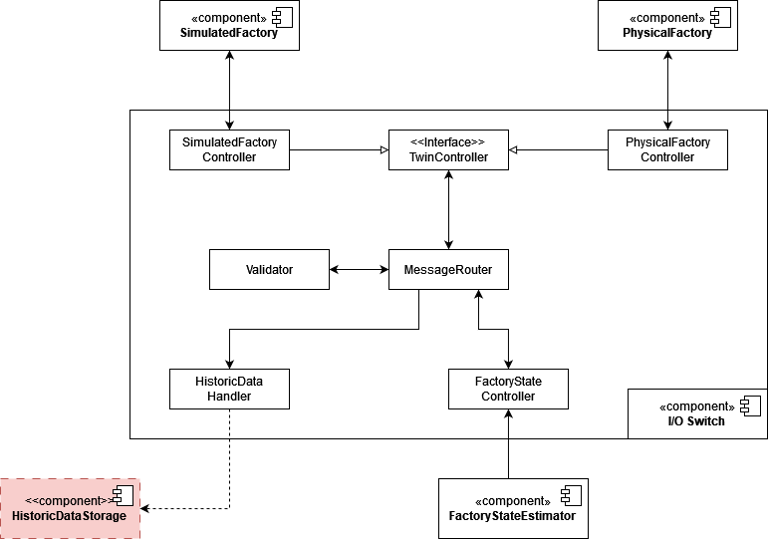
This component is responsible for routing (forwarding) an actuator and sensor data to the other components. There is a BaseTwinController.cs abstract class that has the basis of the forwarding and receiving events. In an effort to make the IO switch as general as possible all the messages that are routed internally are in JSON string format. This was done to be as technology agnostic as possible as almost all modern frameworks can work with JSON and it is a well-known technology. This does mean that its clients are responsible for converting all their information into JSON strings.
3. VirtualFactory - Simulation Engine
The Virtual Factory consists of three main components: the FactorySimulator, IoAddressMaps, and the VirtualGateway. The FactorySimulator is responsible for emulating the behavior and operations of the physical manufacturing setup. The IoAddressMaps serve in this setup by mapping the IO names to the endpoint names used within the FactorySimulator, facilitating data flow and command execution. Lastly, the VirtualGateway functions as the intermediary, handling the communication between the FactorySimulator and IOSwitch, This gateway routes sensors data and actuators commands, through communicating with virtual PLCs and throws up the events needed.
4. FactoryStateEstimator - Truth Keeper
This component is responsible for estimating the factory’s internal state based on its sensor and actuator I/O. This internal state is then visualised through the unity-based visualiser component. This estimation is needed as the information that is received from each PLC is discrete but some of the processes are continuous. For instance, the carriers that move over the conveyor belt only interact with sensors in 3 spots along the station. However, we need to determine their position and collision all along the belt in order to visualise them properly. This has overlap with the functionality of the simulator but the outputs are different and are therefore in different components. So, to clarify, this component is only responsible for doing the calculations necessary for Visualisation. The PLC I/O’s are used as input for this estimation but not changed.
5. UnityFactoryVisualiser - 3D Presentation Layer
Built in Unity (C#), this component provides real-time 3D visualization of the factory state. Crucially, it’s purely presentational layer and it performs no calculations of its own, only rendering the state provided by the FactoryStateEstimator.
Tools & Technology Stack
- Programming Language: C# for Unity and backend components.
- Modeling: Unity 3D for real-time visualization and simulation.
- Communication: WebSocket and OPC UA protocols.
- Project Management: JIRA, GitLab, Miro.
My Role & Contributions
This project was a collaborative effort involving a multidisciplinary team of eight engineers. All team members had one or more roles in the project. In addition to my technical contributions, I played the role of Scrum Master and led the agile execution of the project.
As a developer, I took ownership and responsibility for implementing one of the core components called IOSwitch (see Fig 3). It functions as a central router that directs data flow between the physical world and the digital model. It validates JSON-based messages and routes sensor data and actuator commands to the appropriate controllers.
Code Snippet: IOSwitch Event Routing
The following C# code snippet shows how the IOSwitch component routes incoming IO data and actuator commands to the appropriate controllers based on the source and destination specified in the JSON messages.
using Festo.DigitalTwin.ToolBox;
using Newtonsoft.Json;
namespace Festo.DigitalTwin.IOSwitch
{
    /// <summary>
    /// Represents a central hub for managing input/output (IO) operations within the application using event driven model.
    /// The IOHub listens for IO data from the simulation factory, physical factory and factory state controller.
    /// It routes the IO data to the appropriate controller for further processing.
    /// </summary>
    public class IOHub
    {
        private Validator _validator;
        private DataStorage _dataStorage;
        private SimulationFactoryController _simulationFactoryController;
        private PhysicalFactoryController _physicalFactoryController;
        private FactoryStateController _factoryStateController;


        public IOHub(Validator validator, DataStorage dataStorage, SimulationFactoryController simulationFactoryController, PhysicalFactoryController physicalFactoryController, FactoryStateController factoryStateController)
        {
            _validator = validator;
            _dataStorage = dataStorage;
            _simulationFactoryController = simulationFactoryController;
            _physicalFactoryController = physicalFactoryController;
            _factoryStateController = factoryStateController;

            _simulationFactoryController.IODataReceived += (sender, IOData) => RouteIOData(sender, IOData);
            _physicalFactoryController.IODataReceived += (sender, IOData) => RouteIOData(sender, IOData);
            _factoryStateController.ActuatorCommandReceived += (sender, ActuatorCommand) => RouteActuatorCommand(ActuatorCommand);
        }

        /// <summary>
        /// Routes IO data received either from simulation factory or physical factory to factory state controller for further processing.
        /// </summary>
        /// <param name="sender">The source of the IO data, typically the simulation factory or physical factory.</param>
        /// <param name="ioData">The IO data received, in string format.</param>
        /// <remarks>
        /// This method make sure that the IO data is in valid JSON format before routing it to the factory state controller and saving it to the data storage.
        /// </remarks>
        private void RouteIOData(object sender, string ioData)
        {
            string senderClassName = Utility.ObjectToClassNameString(sender);
            // Utility.WriteColoredLine($"[IOHub.RouteIOData] IO data received from {senderClassName} with value ioData: {ioData} ", ConsoleColor.Green);
            Console.WriteLine($"[IOHub.RouteIOData] IO data received from {senderClassName} with value ioData: {ioData} ");

            if (_validator.IsValidJson(ioData))
            {
                _dataStorage?.SaveDataAsync(ioData);
                _factoryStateController.OnIODataReceived(this, ioData);

            } else
            {
                Console.WriteLine("Invalid IO data received.");
            }
        }

        /// <summary>
        /// Routes actuator command received from factory state controller to the appropriate controller for further processing.
        /// </summary>
        /// <param name="command">The actuator command received, in string format.</param>
        /// <remarks>
        /// This method make sure that the actuator command is in valid JSON format before routing it to the appropriate controller.
        /// The destination of the actuator command is determined by the value of the to field in the JSON object.
        /// </remarks>
        private void RouteActuatorCommand(string command)
        {

            if (_validator.IsValidJson(command))
            {
                dynamic? commandObject = JsonConvert.DeserializeObject<dynamic>(command);
                string destination = commandObject.to;

                // TODO: Decide which controller to send the command to
                // Check whether the command is meant for the simulator or the physical factory
                if (destination == "simulator")
                {
                    // Console.WriteLine($"[IOHub.RouteActuatorCommand] Actuator command received from FactoryState to SimulationFactoryController. command: {command}.");
                    Utility.WriteColoredLine($"[IOHub.RouteActuatorCommand] Actuator command received from FactoryState to SimulationFactoryController. command: {command}.", ConsoleColor.Cyan);
                    _simulationFactoryController.OnActuatorCommandReceived(this, command);

                }
                else if (destination == "physical")
                {
                    // Console.WriteLine($"[IOHub.RouteActuatorCommand] Actuator command received from FactoryState to PhysicalFactoryController. command: {command}.");
                    Utility.WriteColoredLine($"[IOHub.RouteActuatorCommand] Actuator command received from FactoryState to PhysicalFactoryController. command: {command}.", ConsoleColor.DarkYellow);
                    _physicalFactoryController.OnActuatorCommandReceived(this, command);
                }
                else
                {
                    // In case the to field is not set to either simulator or physical we route the command to the simulator
                    Console.WriteLine($"[IOHub.RouteActuatorCommand] Actuator command received from FactoryState with unknown destination. command: {command}.");
                    Utility.WriteColoredLine($"[IOHub.RouteActuatorCommand] Actuator command received from FactoryState with unknown destination. command: {command}.", ConsoleColor.DarkCyan);
                    _simulationFactoryController.OnActuatorCommandReceived(this, command);

                }
            } else
            {
                Utility.WriteColoredLine($"[IOHub.RouteActuatorCommand] Invalid actuator command received.", ConsoleColor.Red);
            }
        }

}
}
Result
The major outcome of this project was the delivery of a generic Digital Twin architecture capable of adapting to diverse factory setups with minimal configuration effort. Furthermore, we successfully demonstrated how the Digital Twin implementation of the architecture can be used to visualize, monitor, and control a physical factory setup in real-time.